We want to help you
Covid-19 is a one off event in life, you cannot have planned for it, and it will deliver huge challenge’s to even the best resourced Businesses. But, there are practical steps you can take to minimise the impact on your business, and we thought that we would put a common sense list together to help you. These are not the practical on-site steps, such as 2 Meter distancing, but more Business action points, to ensure your business is in the best possible place to ride out the rough times ahead.
Why listen to Us ?
What makes us a little unique is that we have access to lots of data, independent of Press and agenda driven Companies. This means we can give you an independent view of the true state of the industry. We can see that some of our Customers are actually increasing their sales conversions, whilst others are already struggling to convert quotes to a sale. Commercial and Domestic maintenance is still moving, although with a noticeable drop in activity, but the residential sector has slowed dramatically. This doesn’t mean that there is no work out there, there’s probably more than you think. Now is the time to look at your business to see where you can make real differences.
How can I minimise the impact of the Virus on my Business?
Having analysed thousands of Customers we put together a list of things that you can do to pro-actively do for your business to protect against the fall out of the Coronavirus as much as possible.
We’ve been through a recession once, and it wasn’t great, I suspect many of you have also done the same. It’s not all doom and gloom though, our data shows there’s still plenty of work out there, but you need to be Professional and Price Smart to ensure that you maximise the more limited opportunities out there.
In the last few years the construction industry has been booming, with work being reasonably plentiful and Profit Margins have been good, It’s been reasonably easy to pick up work and it’s easy in these times to run with a bit of extra padding on a Business around the sides. You now need to trim down and focus on what needs to be done.
What are the main points?
- You need to be aware that things have changed, there will be less work, more competition, margins will be tighter and people will have less money… BUT people will still need work doing and quoting for, the quicker you can get into a new mind set, the more chance you have of thriving
- You need to be Professional and Quick to respond to Enquiries, Jobs and Customers, your pricing needs to be right
- – Price the job too low and you will be paying for the clients work to be done for them. Explain to the customer if someone has priced too cheap they will be charging extras or the quality of the work and materials will be poor.
- – Price the job too high and you might not win the job, the market has changed over-night. You might not be able to make the margins you once used to. We are seeing the larger profit margins shrinking already, but the margins are still good on Enquiries that have converted to sales.
So what practical steps can you take?
1) Leads: Treat ANY enquiry Fast and professionally, get the information requested back to the Customer as fast as possible. It will look better than everyone else. These things make a difference
2) Pricing: Ensure that the price that you give them is one where you make money, but are not pricing to high to put yourself out of running for the Job.
3) Extras: Ensure any Extras are carefully noted down, agreed with the customer in advance and then invoiced them once completed, do not save them until the end of the job!
4) Invoicing: Invoice Regularly and receive payments regularly, if the customer doesn’t pay in a timely manner you do need to stop working
5) Credit Control: Chase up outstanding Invoices, be firm and have a credit control process in place of letters if they are not paying, then proceed to court if they won’t pay, the threat will usually make them pay before you get there, people will want to hold onto their money at the moment, but not go to court.
5) Agreements: Get clear terms and conditions laid out to ensure in the event of non-payment you have as much in your favour as possible
6) Material Ordering : Shop around for your materials, this saves thousands a year, we have a lot of data proving if you stay with one company you don’t get the best price. We are not tied into any merchants so are not motivated to steer you in any direction, use our independent price comparison to save thousands of pounds a year of materials with a single click.
Keep the commutations lines open with your customer at all times, they might start to hint that they have no money or recently lost their job, in which case ask them if they are able to pay the next instalment.
Don’t be afraid to raise small claims against customers that have work done, with a clear and precise quote and extra laid out with an audit trail of communication, the Customer will often pay before Court, they just prefer the money in their bank account than yours. Everyone will be like this in times of uncertainty.
Why did we write this?
We have written this as a quick common sense guide for things that you can do right now. It’s what we are seeing from our Customers, we speak to them all the time, but we wanted you to know we have software that will help with all of these things as well, it’s hard to do all the above, there’s just not enough hours in the day.
Our software will help you with each one of these items, allowing you to register jobs in the system the moment they come in, giving you a timeline to be able to get those quotes back to them in good time, knowing that the price is correct. Giving them all the detail will show the customer you have worked on the job correctly, but also even more importantly it protects you from losing money on extras, the quote is clear. If it’s an extra, create a new quote, get the customer to ok it through our system and create an audit trail. Use the invoicing function to get invoices out as and when you need too, smaller more regular invoices on a job are more likely to get paid that large invoices sent every 3 months. Use the single click price compare function to get prices from ANY merchant, not just the ones that come in our system, use those prices to make more margin OR pass those savings onto the quote, ensuring you have a keenly priced quote without losing your profit margins.
If you’re using all these features, you can’t do any more. If you’re not then, the person you are up against might well be, their price could be lower and they could win the job from you.
Last thing is to remember we are here to help you, reach out to us, sure we know software, but we know building pretty well too. We want you to not just survive but thrive!
All the best
The easyestimate.co.nz team!
Remember: If you don’t do all of these things, your competition probably will be!
Act right now
We will be updating this blog soon with much more news and documenting all the new features that we have added, and will be adding shortly.
Also thanks to our new development team who made this possible.
]]>To use the feature, simply add a row as you have done before, and set the type to material. This will show a magnifying glass and clicking this will bring up the material lookup window which allows you to filter by material type, for example electrical, plumbing, building and many many more. You can click on the product name to bring up a picture of the item to check its what you need, then simply insert it back onto the job. The material prices are automatically entered, but you can of course, override the price, like everything else in the system.
You can also search by name rather than filtering as well, using the search button in the top right of the window.
We will be adding more and more prices and materials in the coming weeks, but we wanted to get the first version out there so that you can start using it to help speed up the pricing of jobs.
]]>
It will still automatically create all of the content of the quote covering letter as per your own template, and add all the job detail lines, but it can give you finer control of things like headers and footers in which you can add your trade association logos such as the FMB and NHBC.
]]>The timeline is one of the many great features of easyestimate.co.nz, but its often overlooked. We thought we’d write a quick blog to help everybody get up to speed with flexibility of the feature.
Documents
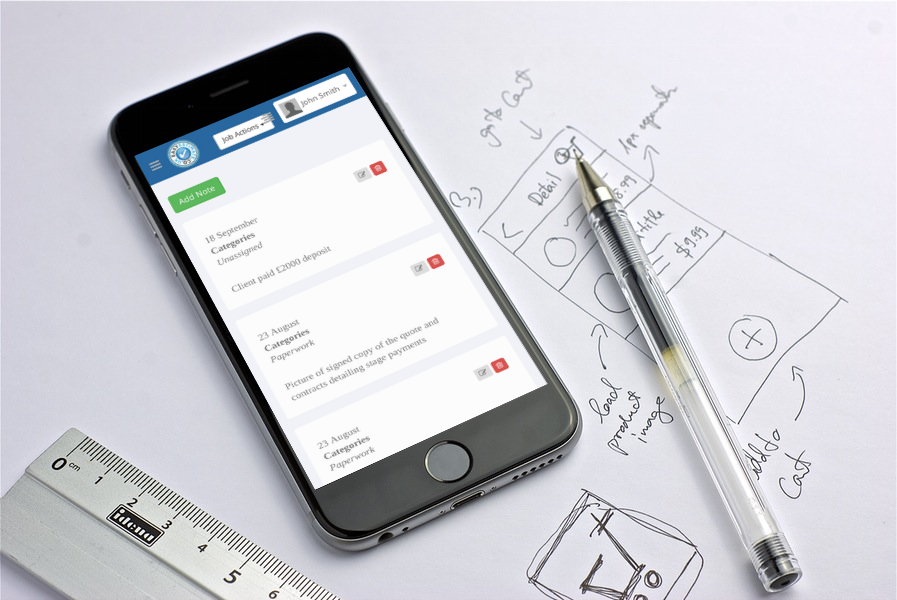
You can create a timeline entry against any job that you have created, this could include photos (from your PC or phone camera), Plans or drawings (PDF etc), CAD drawings, contracts or scanned signed paperwork. All of this is then stored against the job allowing you to retrieve any of these documents on any of your devices as long as you have an internet connection

Payments
Not only can you store documents as mentioned above, but you can also create notes against the job. When you create the timeline entry it date stamps automatically, so you are able to create an entry and see when you put them in, for example, you could add some notes about a call to chase some money that might be outstanding from a client. Simply assign a category such as payments to enable you to pull up a full list of all your contact points by payment details. You can also add the amount paid when you receive money to ensure you stay on top of your billing.
Categories
You can tag any entry with a category, this enables you to filter all the timeline events to give you all the info you need easily and quickly, you could have progress photos, photos of extras that you found along the way (and remember to charge for them!). You can also add finished photos against each job, so if a potential customer wants to see finished photos, just show them immediately on your phone right there and then.

Typically the summer holidays can be a little quieter for some trades, but the feedback we’re getting from our users is that they are busier than ever, so make sure you don’t get behind with any future jobs by logging onto www.easyestimate.co.nz and getting any outstanding quotes sent onto your clients today.
If it’s been a while since you’ve logged onto Easy Estimate, here’s a little recap about what our development team have been busy working on to make our redesigned system quicker and better than ever before. Alternatively, if you haven’t ever used our system to price your jobs, what are you waiting for? It could be the most profitable £9.99 you’ve ever spent!
We’re proud to say our updated website has been redesigned with your needs in mind. The adapted time and money saving features means you can manage your jobs and clients simultaneously without any stress or hard work. As soon as you enter the www.easyestimate.co.nz website you’ll see a brand new job status summary that is designed to help you stay organised.
One of the biggest changes is our new timeline feature which enables you to track activity on every single job, as well as a handy site map. Rather helpfully you can add comments and photographs to your timeline from your mobile phone so any changes to the job can be reviewed at a later date as and when it’s needed.
Depending on the way in which you work, quotes can now be added to both PDF and word documents to help you stay on top of your paperwork. You can see an overall outstanding balance across all jobs, including a notification service to let you know when you’re due to get paid – all designed to help your cash flow when you’re waiting to get paid from jobs.
You’ll also see that the ‘Help’ menu has been improved, so if you have any questions about the Easy Estimate site you will no doubt find the answer here. If not drop us a message via the ‘Feedback’ tab and we’ll endeavour to get back to you as soon as possible. Any suggestions about other ways our developers can improve the site for you will be greatly appreciated as well.
We hope you enjoy using the new Easy Estimate site as much as we enjoyed creating it for you!
The Easy Estimate Team – www.easyestimate.co.nz
]]>The main highlights include:
- Easier to use interface
- More system help included
- Dashboards
- Better compatibility with Devices
- Quicker development time (Features added much quicker)
- New features
- Interactive Maps
- Massively upgrade covering letter designer and template
Finally, I would like to thank the hundreds of customers who use the system – your feedback is invaluable. Please keep it coming!
Many thanks
The easyestimate.co.nz team
]]>
Why is technology important for trades?
As smartphones and social media channels have developed over time, the amount of information that people absorb on a daily basis has also dramatically increased.
What this means is that people are only ever a few clicks away from companies and brands that are important to them – so it’s very helpful to be able to connect with people in a way that is engaging as well as effective.

(Picture credit: www.debatingeurope.eu)
Best Practices For Facebook and Twitter
There are many different social media platforms out there, but the two that trades should predominantly focus on are Facebook and Twitter.
For Facebook, while there isn’t a character limit on how much you should write, you should try to keep your post down to three-to-four lines so it’s concise and to the point.
When it comes to Twitter, make sure you keep tweets to around 110 characters or less – but also support the post with a high quality image as people are seven times more likely to click on a link if it is accompanied by a photograph.
Top tip: Making sure you don’t overload people with information is important. Why? Because in the busy world of social media people often don’t have time to read lots of copy, so try to break up your points and you’ll be more likely to retain the reader’s attention.
They say a picture is worth a 1000 words, and in the world of social media it is very much true.
High quality images can help make you stand out from rival companies and show potential customers what you can do in a simple glance. Any modern smartphone will have a good enough camera to get shots of your work, so be as visual and creative as you can. Remember to move any tools out of your photographs and, take more pictures than you think you need, to make sure you get the best picture possible.
Top tip: A great tip is to take pictures before, during, and after your job to create a visual story of the project as it progresses. It will make the content much more appealing.
Professional trades do fantastic work all the time so it’s really important for them to be able to showcase their skills without having to worry about the photograph being used on social media by anyone else without their permission.
Contrary to popular belief, you don’t need to spend large amounts of time to brand your pictures as you can do it in a few minutes on your smartphone.
The ‘Ezy Watermark’ app allows you to easily watermark and brand photos on your phone or Facebook albums very quickly. The free, easy to use app is a simple way to protect your images and will also create unique pictures for your social media accounts.
Top tip: If you’re looking for any other ways you can use technology to help more win work, Expert Trades make weekly videos which are dedicated to helping trades get the most out of modern technology. Click here to find out more.
Have Facebook and Twitter helped your trade win more work? Tweet us at @easyestimateuk so we can see how our users are using social media to boost their business.
]]>But what do you do when you’re still waiting for payment months after the job has been completed?
Rather than getting disgruntled, try implementing these six steps below and you’ll quickly notice an increase in customers who want to pay on time.
It also means you’ll have more hours in the day to quote for new jobs…happy days!
Step 1: Build a good client relationship
If a client is satisfied with your work they are much more likely to stick to the terms and conditions of your invoice. Building up a rapport with clients will mean they will recommend you to friends and family – and the value of word-of-mouth recommendations can never be underestimated.
Step 2: Think ahead
It’s easy to forget when an invoice needs to be submitted to a client. Set a reminder on your laptop, or mobile device, so the invoice can be sent out as soon as you know the client is happy with the finished project. Some software packages let you install an alert so you know when the invoice has been opened via email which is always handy!
Step 3: Reference numbers
It sounds so simple, but lots of builders forget to consistently use invoice numbers when they are staging clients’ payments. If you have references for every payment made you’ll know exactly how much a client owes you throughout the job and when any funds needs chasing up.

Step 4: Create a distinct invoice
If a client has undertaken a big project you may not be the only contractor waiting to get paid. Ensure your invoice stands out from the rest by incorporating your logo into the overall design so it looks more professional. Making the content easy to follow so there isn’t any confusion over the work completed will also help.
Step 5: Discuss payment terms
Think carefully about your terms of payment – asking for payment within a shorter timescale may speed things up. On average most clients will pay a few weeks after the invoice has been submitted so this needs to be taken into account. As soon as a client accepts your quote make sure you confirm your payment terms in writing to prevent any confusion further down the line.
Step 6: Don’t harass any clients for payment
Always chase invoices with a phone call rather than an email which is less personable and can be easy to ignore. A good tip is to only contact clients during working hours (early mornings and evenings should be avoided) and just one phone call a week is enough to regularly remind customers that they need to log onto their internet banking and pay you! Communicating with your client is key to keeping everyone happy and the jobs rolling in.
Do you have any tips for getting your invoices paid on time? Why not tweet them to us at @easyestimateuk.
]]>You’re shattered after a busy day at work and all you want to do is sit down and watch Gogglebox on TV before sloping off to bed because you’ve got to be up and on site at the crack of dawn the next day.
But, at the back of your mind you know you’re running behind with your quotes and you’ve had a few client’s email chasing up work which you know you should have priced weeks ago.
Surely it won’t matter if you tell them you’ll get back to them at the weekend?
Well, actually it does.
The longer it takes to compile your quotes, the more harm it will do your business. As well as looking unprofessional and inefficient, leaving clients waiting for a quote will mean they immediately have a negative impression of you. And it may mean you lose the work – even if you do quote a fair price.
If quoting is starting to become stressful it can help by getting organised
Why not start preparing a quote when you’re surveying the job? If you make adequate notes on materials, and discuss the use of subcontractors when you’re there, you won’t need to make any assumptions because the information will be fresh in your mind. Remembering to ask to see the client’s plans and drawings will also save you hassle in the long run.
Bashing out a quote on a word document will be time-consuming. Using an estimating software package, like Easy Estimate, means your quote will be presented well and will be easy for the client to understand. Easy Estimate have a range of templates to use for builders, electricians, plumbers, painters and carpenters so it couldn’t be easier. And all for £9.99 a month!
Fortunately, with Easy Estimate you no longer have to keep a database of past quotes on a single laptop or computer because you will have instant access to this information on any internet enabled device. This will enable you to quickly create similar jobs in moments – which means pricing for work is much easier and much more efficient than before.
Being knowledgeable about prices will keep customers happy
Knowing your prices is key for getting an accurate quote. Materials and subcontractors all vary widely on the size of a job, so if a client has asked for a fixed price make sure the prices you are using are up-to-date.
Most builders send quotes via email these days and it’s what your client will expect. To save you even more time, Easy Estimate also creates a basic covering letter for each job which is easy to integrate into your quote so it looks professional and creates the right impression as soon as the email pings into their inbox.
Give us your feedback on how Easy Estimate helps you manage your workload by emailing our team at info@easyestimate.co.nz. We look forward to hearing from you.
]]>